As an employee of Swat, you have access to the Vista Web Portal, where you can
securely manage your personal and payroll information. Through the portal, you can:
- Update emergency contacts
- Manage payroll tax withholdings
- View earnings history
- Access additional employee information
Visit the portal at the following link: https://specialtyweldingandturnaroundsllc-hff.viewpointforcloud.com/account/login?ReturnUrl=%2F
Important – Getting Started
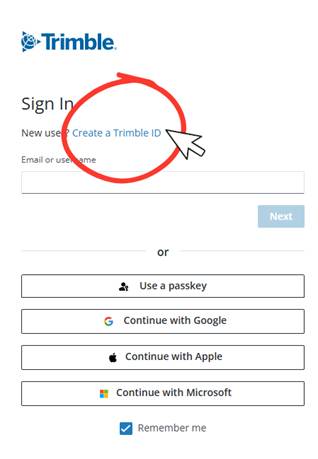
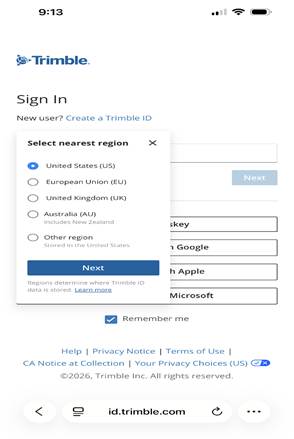
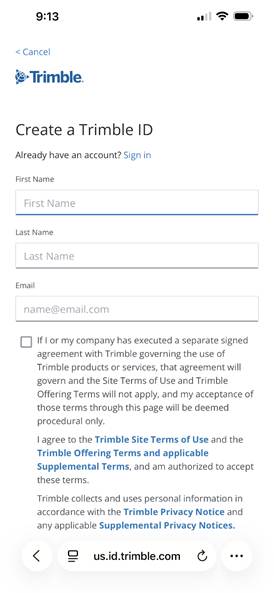
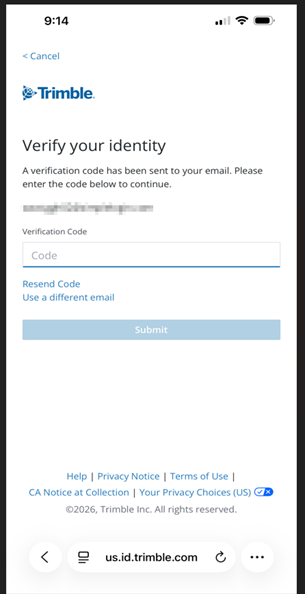
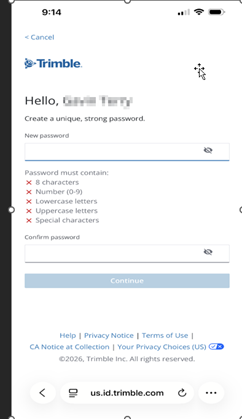
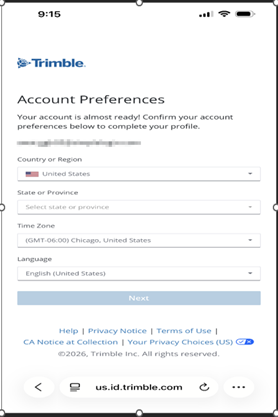
To access the portal, you must first create a Trimble ID.
- Follow the instructions at the link here to create your Trimble ID.
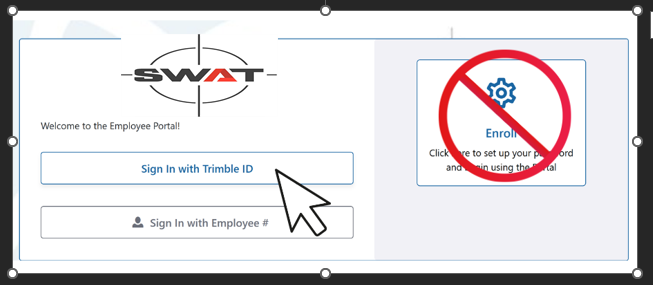
- Once your Trimble ID is set up, return to the Vista Web Portal link above and sign in using your Trimble ID.
Important:
- Do NOT click the “Enroll Now” button on the portal login page.
- All access is completed using your Trimble ID credentials.
- If you have already created a Trimble ID, please proceed with logging in using those credentials.
For further assistance, please contact your HR team.
Was this article helpful?
That’s Great!
Thank you for your feedback
Sorry! We couldn't be helpful
Thank you for your feedback
Feedback sent
We appreciate your effort and will try to fix the article